The Role of Data Rate in Laminates Thermal Limits and Cost Tradeoffs
A laminate is never chosen for loss alone. Data rate decides how low the loss must be, the build decides how much heat the resin must survive, and the budget decides what you can pay. The trick is seeing all three at once.
Start with the data rate
For NRZ signalling, the Nyquist frequency is half the bit rate. For PAM4 it is half the symbol rate, so a 53 Gbps PAM4 lane has a Nyquist of about 13.25 GHz rather than 26.5 GHz.
Take the loss budget for the board route, divide it by the longest route, and you have the loss per inch your laminate must meet at that frequency. Because dielectric loss grows roughly with frequency times Df, a material that is fine at 5 GHz can be the reason a link fails at 13 GHz.
Watch the loss target move
In FlowSimLab's Material selection step you enter the fastest rate, signalling, longest route, budget, layer count, lead-free assembly and environment. Every candidate is then re-ranked at your Nyquist.

At 10 Gbps NRZ over 6 inches, the target is a relaxed 1.67 dB/in and almost every material fits. Move the same board to 53 Gbps PAM4 over 10 inches, and standard FR4 alone costs about 21 dB of the budget. Mid-loss FR408HR needs about 12.9 dB, Megtron 6 about 9.8 dB.
Then the thermal limits
Loss is only half the filter. Thick, high-layer-count boards with lead-free assembly stress the resin and the plated vias. The numbers that matter are Tg, Td and z-axis expansion (z-CTE).
In the 53 Gbps case, FR408HR still fits the loss budget, but FlowSimLab flags it: a z-CTE of 55 ppm/°C is too high for 14 layers. Standard FR4 with a 150 °C Tg is flagged for lead-free assembly at any rate.
Then the cost
Each candidate carries a cost index relative to FR4: about 1.6× for FR408HR, 3.5× for Megtron 6 and 5× for Megtron 7. The cheapest option that passes both loss and thermal checks is usually the right one. Paying 5× for headroom you will never use is a common, expensive habit.
See the tradeoff in one picture
Columns of numbers hide the tradeoff. The property spider shows it.
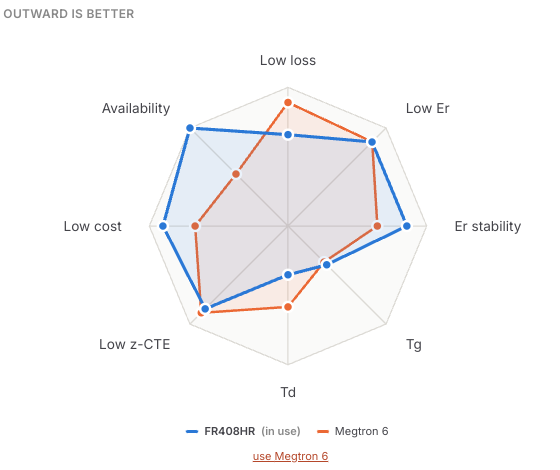
Tick two laminates and FlowSimLab draws them on eight axes: low loss, low Er, Er stability, Tg, Td, low z-CTE, low cost and availability. In this pair, Megtron 6 reaches further on loss and Td, while FR408HR reaches further on cost and availability. If your loss budget closes with FR408HR, the chart makes it obvious what the upgrade would buy you, and what it would cost.
A Priority switch lets you lean toward cost or toward loss, and the chosen laminate flows straight into the channel and stackup steps. For a deeper look at picking materials by interface, see A Practical Guide to Laminate Selection for PCIe and Ethernet Interfaces.
Takeaways
- Work out Nyquist and loss per inch first; it rules out most of the list.
- Check Tg, Td and z-CTE against layer count and lead-free assembly.
- Compare your top two on the spider chart, then pick the cheapest that passes.
- Confirm real Er and Df with your fab.
Next, see how that loss per inch fits into a full channel in How to Budget Loss and Impedance for Multi Layer PCB Stacks.