A Practical Guide to Laminate Selection for PCIe and Ethernet Interfaces
Laminate selection for a standard interface starts with two numbers from the spec: the Nyquist frequency and the insertion-loss budget. Everything else, from loss per inch to cost, follows from those two and the length of your longest route.
Start from the interface
Here are typical values for common interfaces, as used in FlowSimLab's standards checks. Budgets vary by spec revision, so treat them as a starting point.
| Interface | Nyquist | Typical IL budget | Laminate class |
|---|---|---|---|
| PCIe Gen3 (8 GT/s) | 4 GHz | 22 dB | Standard FR4 |
| PCIe Gen4 (16 GT/s) | 8 GHz | 28 dB | Mid loss |
| PCIe Gen5 (32 GT/s) | 16 GHz | 36 dB | Very low loss |
| PCIe Gen6 (64 GT/s PAM4) | 16 GHz | 32 dB | Very low loss |
| 10GBASE-KR | 5.16 GHz | 25 dB | Mid loss |
| 25GBASE-KR / 100G-KR4 | 12.89 GHz | 35 dB | Low loss |
| 100G per lane PAM4 | 26.56 GHz | 28 dB | Ultra-low loss |
Notice that PCIe Gen5 and Gen6 share a 16 GHz Nyquist. Gen6 doubles the data rate with PAM4 instead of doubling the symbol rate, so the laminate class barely changes. What does change is a tighter budget and a smaller eye.
Turn the budget into loss per inch
The budget is shared with packages, vias and connectors. Subtract those, divide what is left by the total route length, and you have the loss per inch the laminate must meet. A short Gen4 add-in card can live happily on mid-loss material. A 20 inch Gen5 server path almost certainly cannot. The full method is in How to Budget Loss and Impedance for Multi Layer PCB Stacks.
Shortlist in FlowSimLab
In the Material selection step you enter rate, signalling, route length, budget, layer count and environment. FlowSimLab re-ranks every candidate at your Nyquist, with loss, route loss, thermal limits and cost side by side. Quick filters help when the constraint is not loss: cheap, thin cores, high Tg, FR4 process or stocked at most fabs.
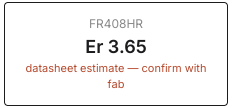
When you pick a laminate, its key number carries forward to the rest of the project.
Make the final call with the spider chart
A shortlist usually ends with two materials that both pass. That is where the spider chart earns its place.
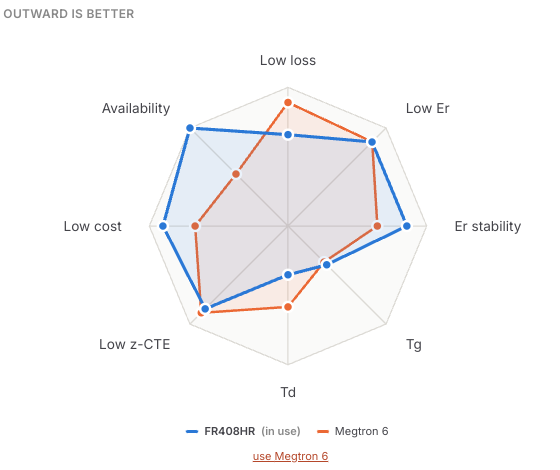
Each axis is a property where outward is better: low loss, low Er, Er stability, Tg, Td, low z-CTE, low cost and availability. In this pair, Megtron 6 reaches further on loss and Td. FR408HR reaches further on cost and availability.
For a PCIe Gen4 design that already closes its budget on FR408HR, the chart says the upgrade buys loss margin you do not need. For a Gen5 or 25G Ethernet design that is short on margin, the same chart says the extra cost is buying exactly what you need. Same picture, different answer, and the reason is visible to everyone on the team.
Practical guidance
- PCIe Gen3 and 10G Ethernet: standard or mid-loss FR4 usually works.
- PCIe Gen4: mid-loss for most designs; standard FR4 only for short routes.
- PCIe Gen5/Gen6 and 25G Ethernet: low or very-low-loss material with smooth copper.
- 100G per lane: ultra-low-loss material, very-low-profile copper and careful vias.
Thermal limits and cost are covered in The Role of Data Rate in Laminates Thermal Limits and Cost Tradeoffs. Once the laminate is set, How to Use Standards Checks to Accelerate PCB Sign Off shows how it is checked against the interface.